Foodzone works out energy one way: the Schofield equations multiplied by activity level, the method the NRVs use. How your targets are worked out shows the equations.
There is no setting to change equations. To use another method, work out the requirement yourself and enter it as a custom energy figure. Some common choices are Mifflin-St Jeor, a BMR measured by indirect calorimetry, or a requirement for a clinical condition.
Mifflin-St Jeor
Mifflin-St Jeor gives BMR in kilocalories a day, from weight W in kilograms, height H in centimetres and age A in years:
- Male: BMR = 10W + 6.25H − 5A + 5
- Female: BMR = 10W + 6.25H − 5A − 161
Multiply by your activity factor for the daily requirement, then by 4.184 for kilojoules:
Energy (kJ) = BMR (kcal) × activity factor × 4.184
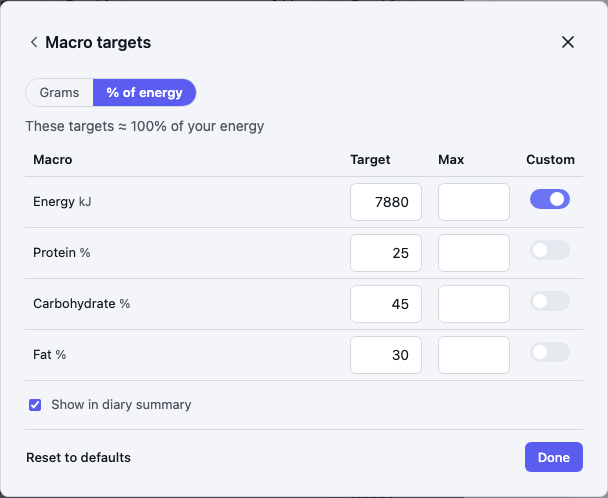
For example, a 35-year-old woman, 165 cm and 65 kg, with an activity factor of 1.4: BMR = 650 + 1,031.25 − 175 − 161 = 1,345.25 kcal. Then 1,345.25 × 1.4 = 1,883 kcal, and 1,883 × 4.184 = 7,880 kJ.
If the profile's Energy units are set to calories, enter the kcal figure and skip the 4.184.
Clinical requirements
For medical nutrition, health professionals often work the requirement out from clinical guidance, such as Queensland Health's Estimating energy, protein and fluid requirements for adult clinical conditions. Enter the result the same way.
Enter the figure
- Open Profile from the diary, then select Edit targets.
- Select Macros, switch Custom on in the Energy row, and type the requirement.
- Select Done, then Save on the profile.
What follows from it
Everything measured against energy is worked out again from the figure you enter:
- Macro targets with Custom off, and macros set as a percentage of energy, are recalculated in grams.
- Macros you set in grams keep their grams; the percentage beside them is recalculated.
- Default food group serves are rescaled to the new requirement.
The figure stays as typed, so update it yourself when weight or activity changes. Switch Custom off to go back to the Schofield figure.