A recipe combines ingredients into a single item you can log. Foodzone totals the nutrition from the ingredients, so a bowl of your stir fry lands in the diary as one entry with real numbers behind it.
On the Actions page select Add action, choose Recipe and the food database, then Create.
Add ingredients
- Next to Ingredients, select Add.
- Search the recipe's food database — your own custom foods are included.
- Pick a result, set the Quantity and Measure, and select Add to Recipe.
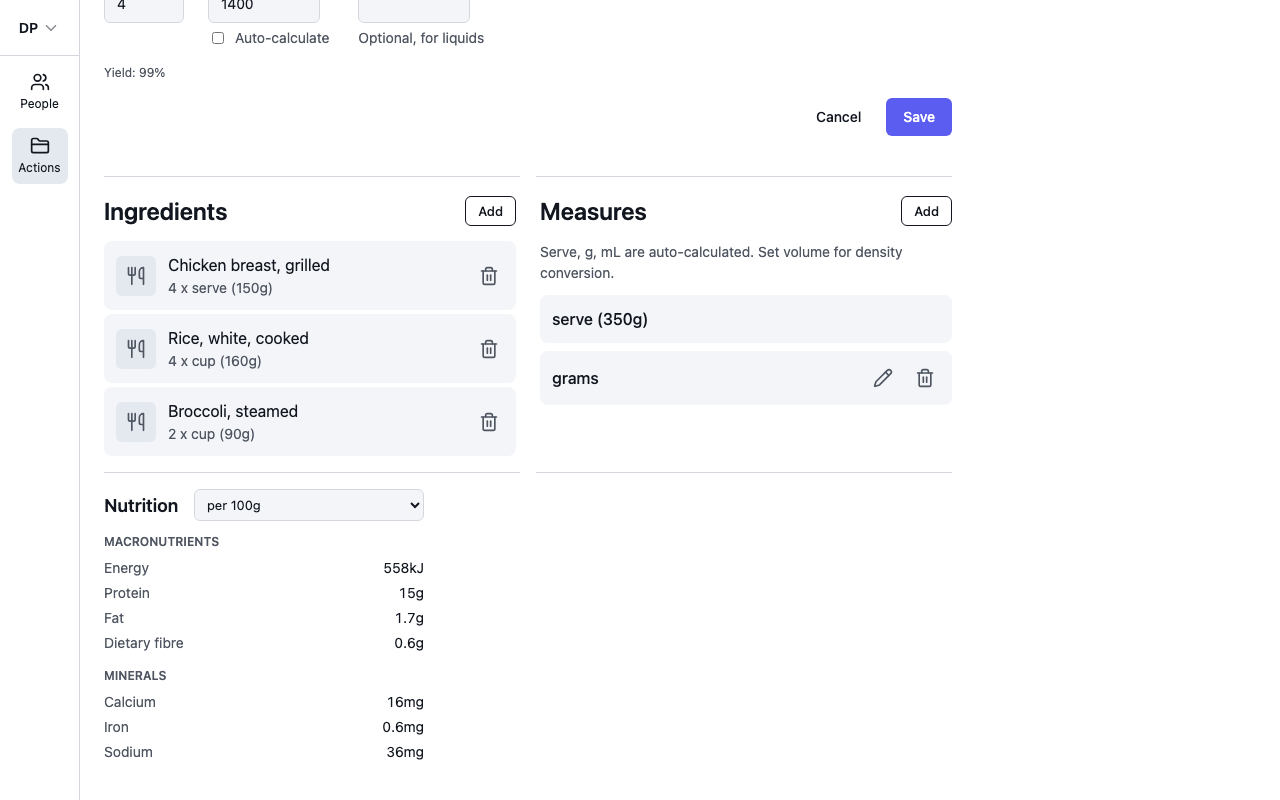
Repeat for each ingredient. To change an amount, select the pencil next to the ingredient; the trash icon removes it. The ingredient weights add up to the recipe's total ingredient weight.
Serves and finished weight
- Serves — how many portions the recipe makes.
- Finished weight (g) — the cooked weight. Tick Auto-calculate to use the total ingredient weight, or untick it and weigh the finished dish — cooking losses matter, and the page shows the yield percentage when the two differ.
- Finished volume (ml) — optional, for liquids like soups and smoothies. Setting it lets you log the recipe by millilitre and shows its density.
From these, Foodzone maintains the recipe's measures for you: grams is always available, and serve is recalculated as you type — finished weight divided by serves, so 1400 g across 4 serves gives "serve (350g)". You can add your own measures too (a jar, a bowl) with Add next to Measures.
Check the nutrition
The Nutrition panel totals the ingredients — macronutrients, minerals, vitamins and food groups. Switch between per 100g and per serve with the dropdown.
Steps and photo
Use Steps to note the method, and the Image section to add a photo — it appears next to the recipe in the diary and in search results.
Select Save when you're done; navigating away with unsaved changes asks whether to discard them.